I'm not sure why, but we decided to use Tumblr for our blog for +Blinkfire Analytics. I think we just wanted to try something different and perhaps a little more modern, but it ended up being a big mistake, so I just finished migrating it back to Blogger.
Tumblr is clearly a great place to run your pornsearchphrase.tumblr.com blog, but not a great place to run a business blog. Search engines don't seem to like it at all, and the inability to add any metadata around your content is a bit crippling. Plus, Tumblr stopped supporting FeedBurner redirects for some reason breaking all sorts of user's feeds and podcasts. Three strikes and you're out.
Luckily, we mapped a custom domain name to the Tumblr, so switching was pretty easy, though a bit roundabout.
1) Turn off the custom domain mapping on tumblr
2) Create an account at wordpress.com and import your tumblr blog
3) Export from Wordpress.com to your desktop.
4) Use the http://wordpress2blogger.appspot.com/ app to convert your export file from #2 to a blogger.xml file
5) import file from #4 to a new blogger blog
6) add the custom domain to the blogger blog
7) change DNS to point your custom domain to blogger
Now, to add some new content there...
Search

Custom Search
Monday, February 24, 2014


Tuesday, January 14, 2014
Firefox is still the leading browser for my blog readers

This blows my mind. I haven't used Firefox for years. The bubble in which I live has everyone using Chrome. Chrome is third.
What's even more amazing is that Firefox isn't a default browser on either Windows or OS X. Users had to choose it.
Android is now winning for me over iOS

I'm preparing to switch over to Android for good. Since the release of the Google Nexus 5
 , I've been carrying both an iPhone 5, and the said Nexus 5. Essentially, I use the iPhone for my personal phone, and the Nexus for work. But I gotta say, I barely even use the iPhone. The Nexus and KitKat are just so ingrained into my work and lifestyle, being connected with Gmail, hangouts and my Google accounts, that it's really just my go-to device for almost everything.
KitKat is so easy and smooth, and iOS 7 is just, blah. Android has been making quantum leaps between versions (granted, they've been playing catch up), where the only interesting feature that has been added that's interesting on iOS7 is easy access to the flashlight.
, I've been carrying both an iPhone 5, and the said Nexus 5. Essentially, I use the iPhone for my personal phone, and the Nexus for work. But I gotta say, I barely even use the iPhone. The Nexus and KitKat are just so ingrained into my work and lifestyle, being connected with Gmail, hangouts and my Google accounts, that it's really just my go-to device for almost everything.
KitKat is so easy and smooth, and iOS 7 is just, blah. Android has been making quantum leaps between versions (granted, they've been playing catch up), where the only interesting feature that has been added that's interesting on iOS7 is easy access to the flashlight.Even on the music side, where I think Apple and iTunes have traditionally led leaps and bounds above Google Play, whenever I add something to iTunes, Google Play Music picks it up and uploads it. It's available on my device sooner than it is on iTunes match because of how iTunes match refreshes on the device.
On the tablet side, I've seen the same thing. I barely touch my iPad, and instead gravitate to my Google Nexus 7
 every night.
And the Nexus Wireless Charger
every night.
And the Nexus Wireless Charger is pretty amazing and convenient.
Now, every company I work with still develops an iOS version of their app before the Android version, so I'll still need to keep the iPhone around - but I'm getting tired of carrying two phones.
I'm ready to switch for good.
Thursday, December 12, 2013
Using GitHub for (almost) Everything
I've spent a lot of time in the past hunting around for the "best" product development "management" tools to use for my various entrepreneurial ventures, as well as the companies I advise, invest in, or otherwise work with. When I talk about management tools, I'm specifically talking about tools that support:
- product requirement docs (PRDs)
- product roadmap and enhancement priority lists
- bug tracking
- task tracking
- release and milestone tracking
- code reviews
- code versioning and release management
I've tried using separate tools for each part of this stack thinking that for instance, a specific tool for tracking tasks would be better than a tool that had task tracking as auxiliary feature, or that keeping a priority feature list in excel would be easier to manage and sort separate from code features.
However, in the last year or so, especially with the way we have the distributed team structured working on Blinkfire Analytics, I've come to the conclusion that GitHub is really all we need. Now, all my data points come from teams of less than 10 people, so I don't know how this scales yet, and there are of course some documents that are perhaps better suited to be Google Docs, especially if they are simultaneously collaborative, but otherwise GitHub is doing just fine.
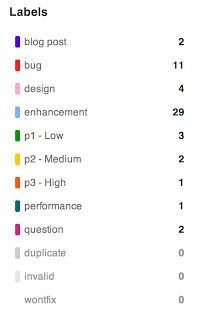
My general product management process is to enter features (designed or not), tasks, bugs, and questions for discussion as "Issues" in GitHub, and create labels such as these:
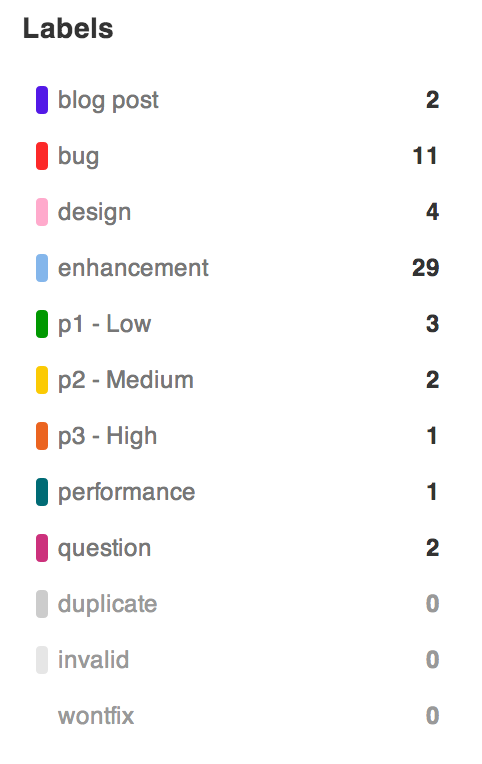
and then to tag each issue as appropriate. Separately, we create "Milestones" that tie to major feature or PR releases, and list those as well. For instance, there might be a "Pen Blog Post on Follower Feature X" as a task tied to that release milestone, and that would be tagged as a "blog post".
Every change and comment goes out to a mailing list that all team members are subscribed to that keeps everyone in the loop.
We've still had a few times where a design doc was appropriately penned in Google Docs - but that's okay - because it's been easy to embed or link to within GitHub.
Let's see how far we can take this and how many people we scale to before GitHub becomes a limitation.
We've still had a few times where a design doc was appropriately penned in Google Docs - but that's okay - because it's been easy to embed or link to within GitHub.
Let's see how far we can take this and how many people we scale to before GitHub becomes a limitation.
Tuesday, May 15, 2012
Yes to running to get to know a city
I couldn't agree more with Brad Feld on this one - running around a city is the best way to get to know it. In fact, I make a point in every city I go to, new or not, to explore as many mornings as I can by taking a nice long run. I'm an explorer in general when travelling, but running is of course a bit quicker, and I make mental notes of places to explore more later in the day.
Interestingly, I find that I can run almost twice the distance in a new city on a trip than I can at home. The new sights, sounds, and smells somehow take away the boredom of running the same paths you've been on many times. I actually am not much of a runner, but always run when I travel.
My favorite cities to run around have been Tokyo (which is totally safe, and even more interesting if you run at 6am when all the bars are closing and the streets are filled with drunk teens), Barcelona (which you can see a bunch of different districts in one run), London (which has some great parks to run through), and San Francisco (there's nothing like a run on the entire Embarcadero in the morning).
Interestingly, I find that I can run almost twice the distance in a new city on a trip than I can at home. The new sights, sounds, and smells somehow take away the boredom of running the same paths you've been on many times. I actually am not much of a runner, but always run when I travel.
My favorite cities to run around have been Tokyo (which is totally safe, and even more interesting if you run at 6am when all the bars are closing and the streets are filled with drunk teens), Barcelona (which you can see a bunch of different districts in one run), London (which has some great parks to run through), and San Francisco (there's nothing like a run on the entire Embarcadero in the morning).
Wednesday, April 25, 2012
Chromebook just got infinitely better, and this is the future of Android

I've been using a Samsung Chromebook Series 5 500C for some time now, but to be honest, I was getting ready to sell it because I just couldn't get used to having only one browser open at time. Especially with multiple Google accounts, it just didn't mirror how I work on my Mac with multiple Chrome profiles for every Google account I use. Fifteen full page tabs just feels weird.
The newest release into the Chrome OS dev channel just changed all that. It allows for multiple Browser windows to be overlapped, and includes a ribbon launcher on the bottom of the screen that makes this feel more like a computer.
To get the newest release, you go to the wrench, select "About Chrome OS", select "more info..." and choose "Dev - Unstable". The next time your Chromebook looks for updates, it will download this version, which although it is called "Unstable" has been pretty stable for me.
This all got me thinking...this is probably one of the biggest reasons I don't take a tablet seriously for getting real work done. That is, the multitasking presentation that exists today on iOS and Android just doesn't make sense for how my brain thinks about multitasking apps. I need to see the multiple windows to remember they are there.
The closest I've seen to this being solved is Chrome on Android. There's an affordance that's always there to tile the multiple windows, and it just works so much better than having to remember that button is down there to see the other programs that are running on Android. And having to double button on iOS - I wonder how many people know that is there. The simplicity of iOS doesn't work for me. My brain craves something more complex.
If Google can solve the multi-window problem in Android like they have in Chrome for Android, and merge that with Chrome OS, then I think they will actually have a powerful weapon against Apple. When I can effectively use my Android phone as a Chomebook, then this starts to all make sense.
The Motorola Atrix kind of has a feature like this when you dock it, and although it looks pretty klunky now, perhaps this is one of the things that Google really bought from Motorola mobility, especially if they patented it.
I expect the next iteration of the Xoom tablet, to be a Google tablet, sold like they started selling the Galaxy Nexus yesterday. I expect Chrome to be front and center on said tablet, to pave the way for the Chrome OS/Android merge, with this Moto docking technology coming in the background.
Chrome on Android is already so good, I definitely use it more than I use native apps on my Galaxy Nexus, so this doesn't seem like a stretch.
This post was written entirely on my Chomebook.
[n.b.: this is all conjecture - I don't have any knowledge of this as a strategy from my time working at Google]
Saturday, April 07, 2012
Breckenridge at Dawn
I've been playing a lot with HDR photography. Here's one from a recent trip to Breckenridge from the foot of Peak 8 at dawn.

Monday, March 12, 2012
30 Minutes was all I could take with a Windows Phone
Every six months or so, I get this urge to try a Windows Phone again, so today I took my SIM card out of my LG G2x and popped it in my htc HD7 to try it out again. I was going to try to use it for a week, but I couldn't use the phone for more than 30 minutes and I had to rip the SIM right back out.
It's got one thing going for it: it's super snappy and fast. Way faster than both Android and iOS. And I love fast. But otherwise, this is the worst user experience around.
One of the reasons I got the urge to try the phone again was that I needed to check something in my hotmail account, which I rarely use. Even after logging out and logging back in with my Windows Live account, the phone continued to show me that I had no hotmail messages even though when I went to double check on the web, I clearly did. You want apps that just work, and I got apps that just didn't work.
I went in to update the 10 or so applications I had installed, as the phone told me they were in need of update, but I got a "Windows Live service is down" - sorry.
The IMAP client to Gmail is just horrible.
Maybe this is the best experience around if you have an Exchange account, but I don't get it.
The "Metro" UI to me doesn't work because it wastes too much space. I don't need title bars and fonts that take up 10% of the screen. It works okay on the Xbox, but not so much on a phone.
I think a lot of this does have to do with perspective. I saw this article by Danny Sullivan, who I respect and think knows what he is talking about, on how Android needs a better email client and it is amazingly the opposite of what I think.
If you use Google apps or Gmail as your primary method for calendar and email management, there's nothing better than the Android interface, and actually the iOS mail client is terrible. It doesn't bring the Gmail experience to iOS at all, but then again, I don't think Google's iOS Gmail client does either, as it doesn't support multiple accounts (last time I checked).
At any rate, I've seen the new Lumia phones, and although they are nice, I can't see myself ever using one of these phones.
It's got one thing going for it: it's super snappy and fast. Way faster than both Android and iOS. And I love fast. But otherwise, this is the worst user experience around.
One of the reasons I got the urge to try the phone again was that I needed to check something in my hotmail account, which I rarely use. Even after logging out and logging back in with my Windows Live account, the phone continued to show me that I had no hotmail messages even though when I went to double check on the web, I clearly did. You want apps that just work, and I got apps that just didn't work.
I went in to update the 10 or so applications I had installed, as the phone told me they were in need of update, but I got a "Windows Live service is down" - sorry.
The IMAP client to Gmail is just horrible.
Maybe this is the best experience around if you have an Exchange account, but I don't get it.
The "Metro" UI to me doesn't work because it wastes too much space. I don't need title bars and fonts that take up 10% of the screen. It works okay on the Xbox, but not so much on a phone.
I think a lot of this does have to do with perspective. I saw this article by Danny Sullivan, who I respect and think knows what he is talking about, on how Android needs a better email client and it is amazingly the opposite of what I think.
If you use Google apps or Gmail as your primary method for calendar and email management, there's nothing better than the Android interface, and actually the iOS mail client is terrible. It doesn't bring the Gmail experience to iOS at all, but then again, I don't think Google's iOS Gmail client does either, as it doesn't support multiple accounts (last time I checked).
At any rate, I've seen the new Lumia phones, and although they are nice, I can't see myself ever using one of these phones.
Sunday, March 11, 2012
Where Microsoft is really getting hit hard: new developers
I've been talking to a lot of college engineering students these days, both through NUvention Web and also via other ties into Northwestern, and the one thing I've noticed is that Microsoft is a company that is totally absent from their periphery when it comes to programming enviroments and technologies.
When you give students a chance to build something, using Microsoft technologies isn't something that would ever even enter their mind. First choices seem to be Ruby on Heroku or Python on Google App Engine.
It makes me think Microsoft is in a world of hurt from the developer standpoint. Try finding a new college computer science major who wants to learn .NET technologies. I haven't found one yet. This seems to me to be a problem for the longevity of the company, as engaging developers is important.
This isn't a surprise to me, but I'm just recording it here as another data point.
When you give students a chance to build something, using Microsoft technologies isn't something that would ever even enter their mind. First choices seem to be Ruby on Heroku or Python on Google App Engine.
It makes me think Microsoft is in a world of hurt from the developer standpoint. Try finding a new college computer science major who wants to learn .NET technologies. I haven't found one yet. This seems to me to be a problem for the longevity of the company, as engaging developers is important.
This isn't a surprise to me, but I'm just recording it here as another data point.
Wednesday, February 15, 2012
It's all about thin

While cleaning out my basement last weekend, I found my first laptop. It was a Thinkpad 750Cs with a passive matrix screen, and a 170MB hard drive, I believe. Yes, that's MB.
I was working for Andersen Consulting at the time, and working 16-18 hour days on top of an hour and a half commute, so working on the train was absolutely critical. This could barely run the ParcPlace Smalltalk distribution we were developing our architecture on at the time, but it was still useful.
I haven't touched this machine in years, but besides it being really really heavy (I can't even find a google search that will reveal what it weighs) the first thing I noticed about it was that it has almost the exact same footprint as my 11" MacBook Air.
I've used smaller and bigger laptops, but I find this size is about right for what I need. The utility of that dimension hasn't changed. But the thinness is what has and makes the MacBook Air such a useful too, especially for travelling. Apple really got this right.
I find it's the same thing with phones. Thinner the better. They can be a little bigger on the height and width, but the depth has to be as thin as possible. That's probably why I'm enjoying the Galaxy Nexus right now. Huge screen, great for email and reading books on the Kindle application, and thin enough to be unobtrusive in the pocket.
Monday, February 13, 2012
Sony and AdWords Remarketing Really Want me to Buy a Nex-5N
A few days ago I did a search for the "Sony Nex-5N" camera, and most likely clicked on the promoted (when ads move from the right column to the top, they are called "promoted") text ad that Sony is running on Google search. This took me to Sony's site on the Sony NEX line, as expected.

I didn't buy the camera from them, but they sure want me to. In fact, whenever I go to any site that has a block of Google AdSense text ads, there's an ad for the Nex-5. Here's four examples from sites you probably recognize.
 |
| from PCMag |
 |
| from LA Times |
 |
| from Chicago Tribune |
 |
| from CNET |
Spooky? no. Is Sony reading my mind? Invading my privacy? no.
This is Google AdWords remarketing at work. And it's working beautifully. It's like my own private reminder that I want to buy this camera as I browse the web all day long. It's stuff like this that is making Google's Display business $5 Billion per year. From the AdWords help:
Next, a small piece of code called a remarketing tag is embedded on your homepage, for example. This code tells AdWords to save visitors to your "Homepage List." When people visit your homepage, their cookie ID is added to the remarketing list. Once the remarketing tag is in place you can create an AdWords campaign that targets messages only to people on your "Homepage List" while they browse the Web. Your remarketing messages won't be shown to people who aren't on the list.
The remarketing tag can be embedded on any page within your website, not just the homepage, so you can develop more detailed audiences. For each remarketing list that you want to create, embed a different tag. If you want to create a "Homepage Visitor" list and a "Completed Conversion" list, you need two separate tags -- one to go on the homepage, and one to go on the conversion page. Learn more about remarketing and users' cookies.
There's a balance between creating very detailed and broader remarketing lists. While detailed lists allow you to further target your message, you'll get the most scale and volume with broader lists. Read more on strategies for your remarketing lists, and learn how to tailor your creatives to these lists.
I'll let you know how the camera is.
Tuesday, February 07, 2012
Chrome for Android...wow
|
|
||||
|
|


Some quick thoughts on Google Chrome for Android:
Awesome user experience. For a beta, it's incredibly polished. The animations on the Galaxy Nexus are smooth, and just beautiful. This is the mobile browser you want to look at. You can't see it in the stills, but when you dismiss tabs, they fly off the screen at an angle. Really slick.
The best execution of multiple tabs on a mobile browser I've seen.
It pre-fetches websites it thinks you want to read next - if you want it to. The default is not to do this on the mobile network. ( I wonder if it generates ad impressions for pre-fetched pages, or if they've created an API with Doubleclick to delay impressions somehow. )
When there are no tabs open, your recently closed tabs are there in a list.
According to html5test.com the browser implements 343 out of 475 of the necessary actions (compared to iOS5 Mobile Safari doing 305) and it does seem to render most websites better than anything else I've seen on a mobile device.
And it's fast. I'm sold.
It sure seems to me that the rate in which Android and its collection of apps and services are improving is faster than the rate in which iOS and its apps and services are improving. I personally find myself grabbing my Galaxy Nexus over any other phone about 90% of the time these days. My iPhone is getting jealous for sure.
Monday, February 06, 2012
Sharing Affiliate Links on Pinterest part of their model?
I got an invite to Pinterest the other day, so I decided to play around with it to see what all the hubbub was about. The road is littered with web clipping services and bookmarking engines but this is the one that has seem to have found its niche, especially with the female demographic.
So I found a few guitars I liked, and pinned them up. To my surprise, I seemed to get some immediate engagement with people I neither followed nor followed me, which got me thinking...wow, what a perfect affiliate link vehicle.
So I decided it was worth a test. I found some pictures of camera bags I like, and generated some affiliate links for them via the Google Affiliate Network. I pinned them up.
Then I saw the related links:
 and thought, wow, okay, so obviously someone else has thought of this too.
Accidentally or not, as it turns out there are a ton of affiliate links from GAN in Pinterest:

(unfortunately for whoever the original publisher was, most of the links are broken because of an encoding issue - the links on a lot of these products seem to have the ampersand URL encoded in the link so they don't work.
http://gan.doubleclick.net/gan_click?lid=41000613802215716&pubid=21000000000517668
)
My first thought was, wow, they're gonna get spammed, big time on this. But again, as it turns out they already know this.

This is from one of the boards in the search above. They've already detected that the links go to GAN and warn the user as such.
So smart, this is part of the plan. See how products convert on the affiliate networks, and then probably create their own affiliate network. I'm guessing that's their business model.
So I found a few guitars I liked, and pinned them up. To my surprise, I seemed to get some immediate engagement with people I neither followed nor followed me, which got me thinking...wow, what a perfect affiliate link vehicle.
So I decided it was worth a test. I found some pictures of camera bags I like, and generated some affiliate links for them via the Google Affiliate Network. I pinned them up.
Then I saw the related links:

Accidentally or not, as it turns out there are a ton of affiliate links from GAN in Pinterest:
(unfortunately for whoever the original publisher was, most of the links are broken because of an encoding issue - the links on a lot of these products seem to have the ampersand URL encoded in the link so they don't work.
http://gan.doubleclick.net/gan_click?lid=41000613802215716&pubid=21000000000517668
)
My first thought was, wow, they're gonna get spammed, big time on this. But again, as it turns out they already know this.

This is from one of the boards in the search above. They've already detected that the links go to GAN and warn the user as such.
So smart, this is part of the plan. See how products convert on the affiliate networks, and then probably create their own affiliate network. I'm guessing that's their business model.
Sunday, February 05, 2012
How does the MP3 album cost more than the CD?


Really, how does this even happen? It seems nuts in this day and age that any MP3 album would cost $17.98 anyway, even if it is a double album. But for the CD to be less is even more ridiculous!
Wednesday, February 01, 2012
MacBook Air 11 inch vs 13 inch battery life
A little over a year ago I wrote about how the battery life on my 13" MacBook Air was really great, a little over 6 hours when it was new. Plenty of juice to last a Chicago to San Francisco flight.
More recently I began using an 11" MacBook Air, to save a little weight in the backpack and to make it fit a little better on the airplane for those times when the person in front of you decides to recline their seat at full speed without warning, and thus crunching your laptop screen. (Karma would put such people in front of a 3 year old on their next flight who likes to kick the seat and open and close the tray the entire flight).
Now, this is not an apples to apples comparison because I have wifi on in flight versus not, but the 11" MacBook Air has a substantially weaker battery than the 13". At a 97% charge, I'm getting a 2 hour and 40 minute time, which I've found to be pretty accurate after a couple flights.


Here's hoping that airlines that are good enough to have in-flight wifi will also consider providing power outlets. Actually, I need to read a few books an relax for the last hour anyway...
More recently I began using an 11" MacBook Air, to save a little weight in the backpack and to make it fit a little better on the airplane for those times when the person in front of you decides to recline their seat at full speed without warning, and thus crunching your laptop screen. (Karma would put such people in front of a 3 year old on their next flight who likes to kick the seat and open and close the tray the entire flight).
Now, this is not an apples to apples comparison because I have wifi on in flight versus not, but the 11" MacBook Air has a substantially weaker battery than the 13". At a 97% charge, I'm getting a 2 hour and 40 minute time, which I've found to be pretty accurate after a couple flights.
Dimming the keyboard after 5 seconds of inactivity gets me another 27 minutes. This gets me about what I need for a Eastbound flight from the West coast to Chicago, but not a Westbound flight where it's sometimes an hour longer.
Here's hoping that airlines that are good enough to have in-flight wifi will also consider providing power outlets. Actually, I need to read a few books an relax for the last hour anyway...
Sunday, January 29, 2012
Motorola Xoom won't boot?

My Motorola Xoom a few times has decided to just shut itself off and put itself in a state whereby pushing the power button will not turn it on.
The fix: hold down the power button and the "volume up" button for 3-4 seconds.
Not sure what causes this, but this always seems to fix it.
Sunday, January 22, 2012
My New Relationship between Real-time Social Media and Sports
Ah, the good old days....when I had enough time to watch college football most of Saturday, pro football most of Sunday, and could usually catch Monday Night Football to boot. You couldn't get soccer on cable back then, which left me enough time to study and get my degree.


Later on in life, we'd record games on DVR, and selectively watch later.
I came to realize today that now things are different. I pick up on subtle real-time social media clues and join in on games in progress. All the time.
Take, for instance, today:
Hmm...we might have a game. Let me turn that on.
and
Hmm...well, I don't really care that much about the NFL playoffs now that the Bears are nowhere in the picture, but I better turn this on right now!
Of course there are still games I watch whistle to whistle when I can plan ahead, but this is mostly how it goes.
And it's not like I'm feverishly studying social media instead of watching these games; it's become a form of ambient music playing in the background - multiplexed into the 10 other things I have going on in the day.
I can hardly wait until each of those examples above has a "click here to join the game in progress" - but I have a feeling it's not that far off.
Thursday, December 01, 2011
I don't understand Caribou Coffee

Caribou Coffee goes a long way toward giving you a comfortable cup of coffee. There's usually a lot of tables, free wi-fi, lots of comfy couches and chairs. And a nice fireplace, which is awesome in the Winter. The coffee itself is good, and there's a great assortment of interesting coffee drinks you could probably put an umbrella in if they were Polynesian themed instead of North Pole themed.
But here's what I don't get: Caribou's baked goods suck. They are all pretty much horrible. Why go to all this trouble to spend on this great interior and then have such a crappy collection of baked goods? It's like they are running a marathon against Starbucks and fell face first 10ft before the finish line.
Wednesday, November 02, 2011
HUDs for text and tweets
Yesterday, BMW announced that 3 Series cars are going to get full-color Heads Up Display (HUD) capabilities. I was first introduced to HUDs through military fighter F16 video games and often wondered why they weren't in more cars. I've seen them in a few cars to display the speedometer, but I can't recall which models.

With texting while driving quickly becoming illegal everywhere, I think the killer app for HUD would be displaying texts from your phone via Bluetooth, and just being able to press a button to speak a response. This would allow the driver to perhaps keep his or her eyes on the road and not be distracted by the incoming notifications.
I could also see functionality to pipe selected tweets, DMs, or email subject lines as well, though responding to such things would probably be more challenging.
The reality is, I see a lot of people texting while driving, sometimes at stoplights, but mostly going 65 miles per hour on the expressway, and that's kind of scary. But I have to admit, there are certainly many times I am waiting for a message and when my phone goes off, I pick it up and have a look. If I have to respond, I will pull over somewhere and respond.
I'm sure I'm not the first one to think of this but look for this feature to be built into applications in the next couple of years if HUDs roll out to more vehicles.

With texting while driving quickly becoming illegal everywhere, I think the killer app for HUD would be displaying texts from your phone via Bluetooth, and just being able to press a button to speak a response. This would allow the driver to perhaps keep his or her eyes on the road and not be distracted by the incoming notifications.
I could also see functionality to pipe selected tweets, DMs, or email subject lines as well, though responding to such things would probably be more challenging.
The reality is, I see a lot of people texting while driving, sometimes at stoplights, but mostly going 65 miles per hour on the expressway, and that's kind of scary. But I have to admit, there are certainly many times I am waiting for a message and when my phone goes off, I pick it up and have a look. If I have to respond, I will pull over somewhere and respond.
I'm sure I'm not the first one to think of this but look for this feature to be built into applications in the next couple of years if HUDs roll out to more vehicles.
Monday, October 17, 2011
techmeme vs hacker news traffic (one data point)
I always just assumed it would be better to get a link on Techmeme over Hacker News but for this blog at least, it's not the case.
Looking at one post that got one of the "related links" on Techmeme and a post on Hacker News, Hacker News provided over 100X more traffic than the link on Techmeme. Remember your Calculus 101 - the total traffic is the area under the curve of these graphs, not the max(y).
 |
| micro view |
Even if you zoom it out and look at two separate posts spanned out over a period of months, the first one which was a "first class" link from Techmeme, versus an entry in Hacker News, you see the same pattern. It's almost fractal.
 |
| macro view |
Subscribe to:
Posts (Atom)
LinkWithin
