Search

Custom Search

Wednesday, April 21, 2010

Planning a Vacation (or lack thereof) in 2010

Planning a vacation in 2010 is a lot different than planning a vacation was in 2000, or hell, even 2009.   It used to be you had to buy those big paper maps you could never quite fold, buy a couple heavy guidebooks to throw in your pack, and basically have everything planned in advance.

On our most recent family vacation, I decided to try to make it work with only a mobile phone.  Well, two mobile phones, actually: an iPhone and a Nexus One.  Here's what worked, and here's where the plan fell short.

Navigation/Driving
Old way: Before leaving for vacation - enter all driving routes into Google Maps or (gasp!) MapQuest, print out and bring with you
Last Year: Rent a Neverlost from Hertz
This Year: Do a search from the iPhone Maps application or the Car Home application on the Nexus One.  I must say, the driving directions on the Nexus One are pretty fantastic - and pretty equivalent to an in car GPS system.
Where it fell short: Automated directions aren't always the best.  In LA, the directions had us getting off the freeway in Compton and driving to another freeway, when eyeballing the map showed the two freeways had an interchange.

Finding a Restaurant
Old Way: Look up places to eat in a big old paper guidebook like Fodor's or Access.  If you were lucky they were still in business.  When coming from the hotel ask the concierge, which is always a good idea anyway unless they direct you down the hall to the hotel restaurant.
Last Year: Do a Google search on your mobile phone which didn't have mobile optimized landing pages
This Year: Yelp.  Either the iPhone app or on the mobile browser.  Hit the "Nearby" button, read reviews, and use the Map pane to see how to get there.  Yelp has enough critical mass to really work pretty much anywhere I've been, and the places that are rated well do turn out to be great choices.   Then make a reservation with the Opentable iPhone app.   You could skip using Yelp and just use Opentable, but I don't find the reviews to be at critical mass for usefulness with Opentable alone yet.
Where it fell short:  It didn't. At least in the US.   In Europe, we used qype.com, which has a Qype Radar iPhone app.  Make sure you change the language to the local language to see reviews, though.


General Itinerary Information
Old Way:  Print and fold.
Last Year: Search Gmail for your itineraries.
This Year: Forward your Gmail confirmations to TripIt and use the TripIt iPhone App.  Trip it has figured out how to parse most travel email confirmations such that they can easily aggregate a travel itinerary for you.  This service is highly recommended.
Where it fell short: There's no app that can replace tipping the skycap so he gives you the shortcut through security with kids.

I'm not much of a planner, so I like where it's all headed.

Monday, April 12, 2010

News on the iPad: innovating on presentation

There's a great scene in Pulp Fiction that can only be found in the Director's Cut where Mia Wallace asks Vincent Vega if he is an Elvis man or a Beatles man.  I'm paraphrasing, but her point was that you can only be one or the other, really, and that one preference tells you a lot about a person.

I think the same is true for magazines and newspapers.   I have always loved magazines and hated newspapers.  Magazines are shiny and attractive to me, newspapers are dull and ugly.  And that effects how I enjoyed them.  As such, reading news in a newspaper has never been interesting to me.

I think that's why news on the iPad has me excited:  newspaper content is presented real time in the form of digital magazines.

As a function of my job, I spend a lot of time looking at content in various generic newsreaders, and I won't really touch too much on those here.  Because competition has mainly come from social media platforms, we haven't seen a lot of total innovation on presentation from these readers in some time.

That's why I find the newsreaders from the news agencies or media companies on the iPad interesting: they are creating newsreaders which are innovative in presentation, and in my opinion, very useful and engaging.   The clever and efficient use of image and video resources succeeds where previous attempts at general standardization have failed.  Certainly we've been able to mark up feed content like this for some time, but most news readers and feed processing platforms haven't been able to make smart decisions on what to do with such tags.

For instance, the BBC News reader is great, feels like a digital magazine to me, and draws you in first with a standard headline + picture.  The content itself has inline video that just works on the iPad platform, and it just seems really easy to browse the news and share it.


Perhaps not surprisingly, the publishers which never had a printed newspaper are the ones that aren't encumbered by that format, and are the most innovative.  I've mentioned the BBC, but Thomson-Reuters has a great app as well.  In one view, you just start with pictures and jump to the content.


So how do the newspapers do in this endeavor?  Well, it certainly varies.  My favorite news app is probably the USATODAY app, which still looks like it's paper copy, but is a lot more interactive and, well useful.  I'd note that almost all of these things immediately ask for your permission to get your location and try to localize as much as they can.  USATODAY does this with it's weather, AP gets a bit more hyper-local with the news stories themselves.


The WSJ, well, looks like the WSJ - why they took this route, I am not sure since I think their original iPhone app was a bit more innovative in this regard.  I guess they are just hoping that the old men on the train who read the WSJ will see this iPad app as a straight replacement.  For their users, the snippet on the front page is part of their brand and I suppose they are staying with what works, but still, it doesn't seem to utilize the iPad platform at all.


Again, back to my original premise - I'm excited here because some of these news agencies are turning what was traditionally the fodder for boring newspaper presentation into the arguably sexier presentation of a magazine - so I really hope that this space continues to innovate along these lines.

Saturday, April 03, 2010

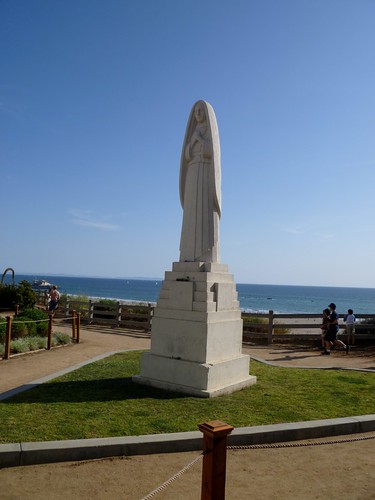
Santa Monica


P1000007, originally uploaded by steveobd.

I'm guessing this actually is Santa Monica, right where Wilshire Blvd. dead ends at Ocean. We thought it was a beautiful walk along the cliffs overlooking the beach.

Storm Over Tuscany


IMG_0424.JPG, originally uploaded by steveobd.

The tower over Lucca. I've always liked this picture, even thought the scenery in the foreground is not spectacular.

more adsense

LinkWithin

Related Posts with Thumbnails